
 vs

Opal will be a better fit if you want schedules, time limits, open limits, and reports; its app is available on iPhone, Android, and Mac. Badger will be a better fit if you want a conversational app blocker that can remember your goals and the context you share, and adjust a plan when an approach doesn't fit.
The Short Version
Opal is a structured, well-organized rules engine that helps you define rules for schedules, time limits, and open limits. It adds a layer of reports, focus scores, friends, rewards, and integration with Apple's Shortcuts and Focus modes. If you know what you want to block and when, this framework may work for you.
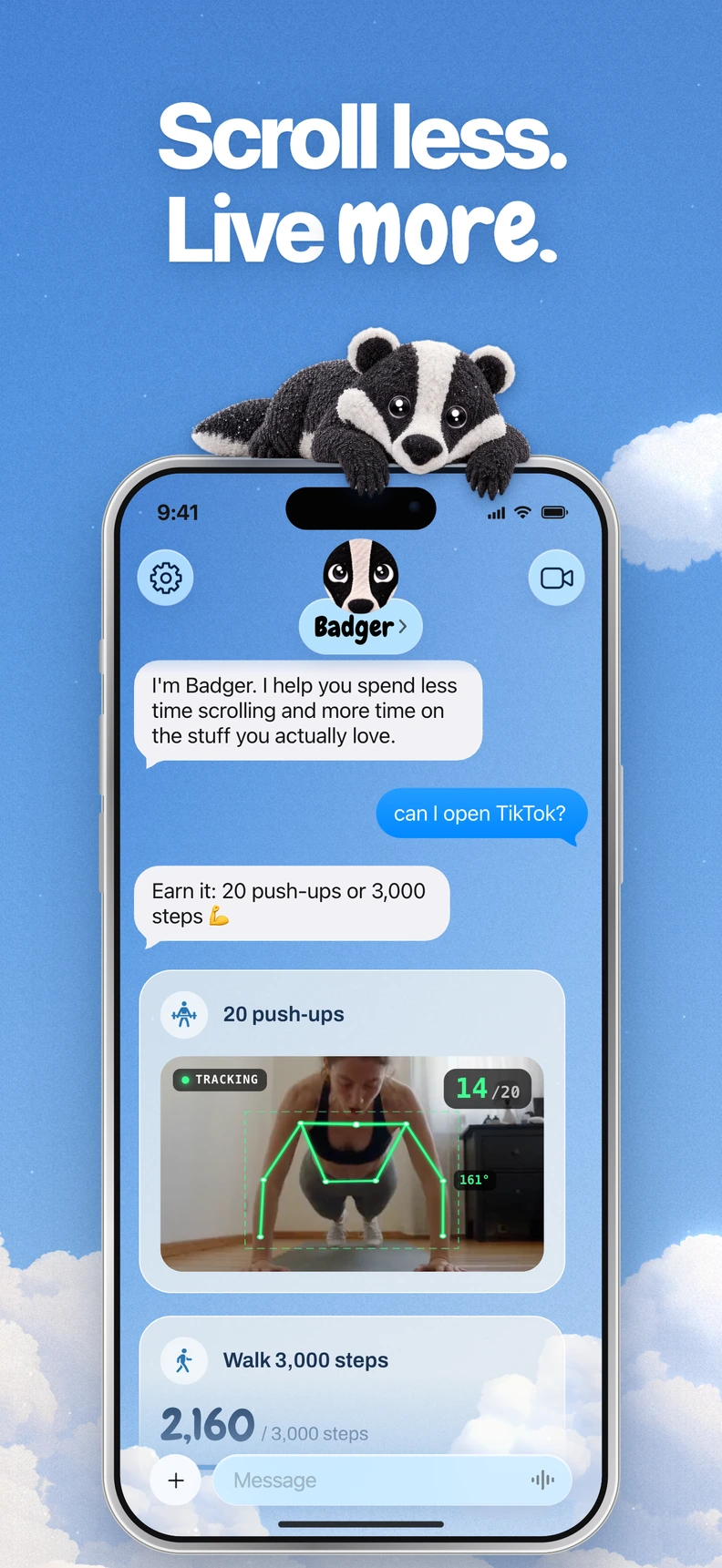
Badger is a personal AI agent focused on one thing: helping you live a more meaningful life. You can text it about what matters to you. It can make a plan, block distracting apps, and help you follow through. Select which apps you want to block with Apple's picker, authorize Screen Time, and organize them into any groups you'd like. Then, use Badger to develop a plan. The agent can remember your goals and the context you share, initiate proactive check-ins, take actions related to whether you have access to apps, and rework the plan if a specific style of blocking isn't working for you. Rather than just saying what you don't want, a plan can be designed around what you want to do with your time (e.g., get new walking steps, reach a step count for the day, get to the gym, or share a photo as part of the plan). You'll design the specific goals and the terms of app access. Badger is focused on iPhone, requires iOS 18 or later, and its App Store listing also supports compatible iPads. It does not provide Android or desktop app blocking.
Badger vs. Opal Comparison
| Feature | Badger | Opal |
|---|---|---|
| Platforms | iPhone (iOS 18+) | iOS, Android, and Mac |
| Blocking Mechanism | Select apps from Apple's picker, authorize Screen Time, name your groups of apps, and design a plan with Badger to block apps | Define schedules, time limits, and open limits, and work with blocklists and allowlists |
| Regaining Access | Designed into the plan; repeating a request won't guarantee the plan gets canceled, but you can use Emergency Unblock to unblock without AI approval or credit | Varies by difficulty level; Easy and Increasing let you set breaks after using the waiting room; Hard restricts normal unblocking and editing; an Emergency Pass can lift restrictions for an hour once a week |
| Personalized Support | Agent can remember your goals and the context you share, and proactively check in | Usage reports, focus scores and configurable difficulty levels |
| Automation | Optionally connect a compatible assistant to request changes for selected app groups | Integrates with Shortcuts and Focus |
| Pricing | Free download, includes a weekly AI usage limit; no subscriptions listed in current pricing | Free tier (one rule, basic timers), and Pro (unlimited rules, Hard Mode) |
Notes: Comparisons listed are based on Badger's public documentation, Badger's pricing page, Opal's pricing page, Opal's schedule guide, and Opal's Open Limit guide as of November 2026. Opal's current pricing page lists $99.99 billed annually and a $399 lifetime option; check checkout for current monthly terms. One older help page mentions three recurring sessions on the free tier, but check the current pricing page before relying on that information.
When to Pick
You want to set up a recurring schedule and let it run. Let's say you want to block access to social media from 9 a.m. to noon every weekday. Opal's scheduled blocks can handle that, and you can add on rules. While Badger can handle blocking apps, its focus is on plans made with its agent rather than rigid, recurring rules. If you just want a schedule-based system, then Opal's framework will be a natural fit.
The same app has different meanings at different times. You could do work-related research, take a planned break, or mindlessly scroll on your phone late at night, all using the same app. Some of that time isn't wasted. Opal's rules engine applies the schedules and limits you set for the app. However, Badger treats the app as a conversation. You can tell the agent what you're trying to do; it can remember that context, and you can work out a plan that can make sense at specific times. This isn't saying that the app knows what you're thinking or what you intend, but rather that you can state your goals and work out a plan that makes sense.
You want blocking to be connected with your future actions. Badger's plans can be designed to connect app access to actions, such as taking walking steps or reaching a daily goal. Getting to the gym isn't a definitive sign that you worked out, and photo assessment isn't infallible, but the direction is different from using more rules. If you've found that straight blocking is just shifting the problem, Badger's strength is pretty clear.
Need coverage on Android or Mac? Badger's public focus is the iPhone. Opal is available on all three platforms (iOS, Android, Mac) if you need an app blocker on Android or Mac as well.
Want to see how rules can be customized for actual situations? Opal's hardest level is Hard Mode, which restricts normal unblocking and editing, but the documented Emergency Pass lets you lift active restrictions for an hour once a week and cancel an active Hard Mode timer. Badger, on the other hand, works by talking through what your actual needs might be – a service that doesn't guarantee a commitment will be canceled if you ask repeatedly, and doesn't require AI validation or any of your AI credits to use Emergency Unblock. Both offer an emergency option to regain access.
Your Quick Decision Checklist
- Are you looking to enforce rules on Android or Mac? Opal supports these systems. Badger focuses on the iPhone.
- Do you want to set up your own rules and reports, or discuss a plan with an agent? Opal with rules, Badger with chat.
- Do you have a newer iPhone (iOS 18 and up)? Badger needs it.
- Do you want to see usage reports and scores? Compare Opal's documented reports and focus scores with the information you want from your blocker.
- Are you into automation? Opal works with Shortcuts and Focus, while Badger can optionally connect to a compatible external assistant via MCP/OAuth (limited use).
- Want to test it out first? Both apps are free, but each has different free-tier restrictions.
FAQ
Does Opal's Hard Mode mean you can never unblock? No. Opal's current help documents an Emergency Pass that you can use once a week to lift active restrictions for an hour and cancel an active Hard Mode timer. Any repeating rules will still kick in afterward.
Can Badger automatically tell what you're doing on your phone? No. Badger doesn't claim to know your exact activity or reason for opening an app. It uses the goals and context you share to help build a plan.
Do you need another AI assistant to use Badger? No. Badger's MCP/OAuth connection is optional and lets a compatible external assistant list authorized groups and request blocks or unblocks with a reason.
Which app costs less? Badger is free to download and use with a weekly AI limit, and the current pricing page doesn't have a subscription. Opal has a free tier and a paid Pro tier. Check both pricing pages for current terms.
How to Get Started
If the conversational approach works for you, download Badger from the App Store, grab a couple of apps that are problematic for you, and build one little plan to see how the approach works for you. Read the guide on AI app blockers and how to block apps on iPhone for more on how to get started, and see the pricing page for current limits and emergency rules. If you're more interested in a set schedule, start with the free tier of Opal and read Opal's guide to schedules before upgrading to Pro.
Sources
Questions or corrections? Use Badger Support. More on the Badger blog.