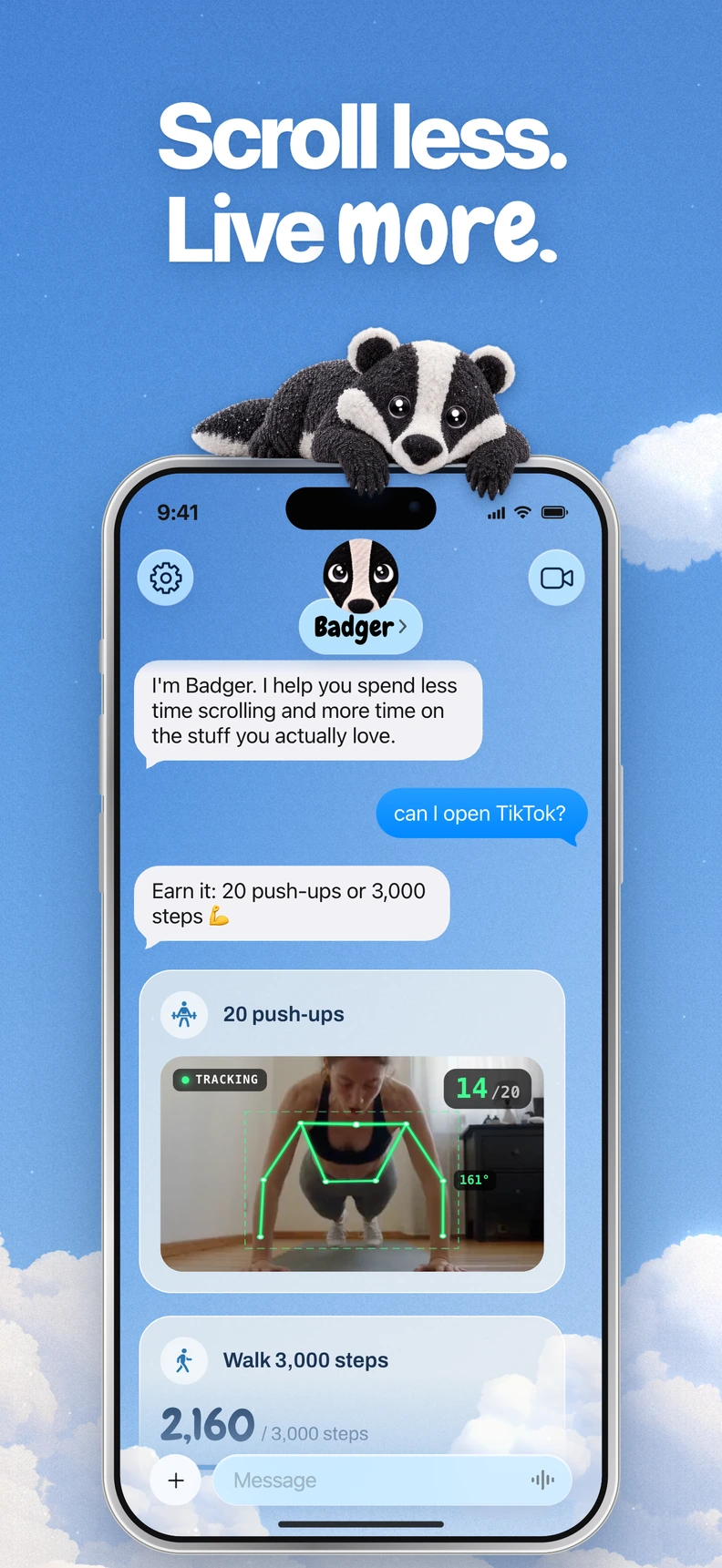

 vs

Badger is a good option if you want an app that helps you build and update an iPhone blocking plan with an interactive agent. Jomo is a good option if you want a customizable app that supports multiple rules and a wide array of unlocking options on both iPhone and Mac. The two apps have some overlap despite their differences. Ultimately, your choice will come down to your preference between a partnership with an AI agent and user-controlled rules.
Who Is Each For?
Badger is a personal AI agent focused on one thing: helping you live a more meaningful life. You can text it about what matters to you. It can make a plan, block distracting apps, and help you follow through. After you select distracting apps using Apple's picker, authorize Screen Time, and create named groups of apps, you can text Badger to make a plan and put it into action. The agent can remember the goals and context you share, check in proactively, and adjust the plan if an approach is not working.
This is useful if you want someone to help you determine what to block, when, and how to block it.
Jomo focuses on a rules-based strategy and works on both iPhone and Mac. You create sessions, schedules/routines, app limits, and reusable app groups, and you choose the level of enforcement. Jomo offers a selection of unlock options, including a delay, reason-giving, copied text, password, QR scan, or AI-reviewed proof. Jomo's feature page on the Mac app also mentions the ability to earn access to websites through the completion of tasks.
This is a better option if you want to design and enforce your own rules and prefer blocking apps on the desktop.
The following information is derived from the official app documentation of each application as of November 9, 2026.
Badger vs Jomo Comparison
| Feature | Badger | Jomo |
|---|---|---|
| Devices | iPhone (requires iOS 18 or later) | iPhone and Mac |
| App blocking method | Apple app picker, groups, and discussion with the AI agent | Sessions, schedules/routines, app limits, and reusable app groups that you configure |
| Unlocking method | Based on your plan: actions like walking steps, a gym arrival, or taking a photo; emergency unblock is available without AI approval or AI credit | Based on your preferences: AI-reviewed proof, waiting period, stated reason, copied text, password, QR scan; tasks to unlock websites on Mac |
| User support | AI agent remembers goals and context you share, checks in proactively, and adjusts the plan when it does not fit | Session reflection and journaling |
| Pricing strategy | Free to download and use today, with a weekly AI allowance; no subscription on the current pricing page | Free plan; $29.99/year, $99.99 single purchase, or $14.99/year student plan (prices may attract local tax) |
Final Verdict
If you want app blocking terms tied to your goals. The same app can be used for multiple different reasons. In other words, browsing the internet in Safari for work research, using the app in the evening to decompress, and an unwanted 1 a.m. scroll are three different things, even though they may involve the same app. You can tell Badger what you are trying to do, and its agent can shape a plan around that. This allows you to talk to the agent and discuss how things have changed.
Jomo has powerful rules and limits, but they are configured by you in advance. Badger's interaction method works well if the issue you are facing is not which apps to block, but when and why you want support.
If you want to unlock your apps by doing something first. Both Badger and Jomo offer ways to connect app access with physical actions. Badger works with you to negotiate a plan, such as a daily step goal, a gym arrival, or a photo. You need to grant the relevant permissions for steps, location, or photos to support those terms in your plan. Jomo lists customizable unlock options and Apple Health integration with walking as an example.
Both apps let you earn access based on what you do. The difference is how access is earned: Jomo offers gates you configure, while Badger helps shape a plan based on your input.
If you want a Mac version or a strict app blocker. The Mac version of Jomo blocks apps, websites, keywords, and URL patterns. This is helpful if your distractions are as prevalent on your laptop as they are on your phone. The Mac feature page says browsers generally need no extension except Firefox. Check how each strict setting handles the situations in which you need access.
Badger can be bypassed or removed. Repeated requests do not guarantee that an active commitment will be cancelled. Badger also offers an emergency unblock without AI approval or AI credit. Jomo's settings can be strict, and it offers a wide range of unlock options. Decide whether you prefer an agent-assisted plan or rules you configure yourself.
Checklist
- Want to block on both Mac and iPhone? Choose Jomo.
- Want to set the rules yourself, or describe your goals and work with an agent on a plan? Choose Jomo for the former and Badger for the latter.
- Want the app to check in and adapt if a plan isn't working anymore? Badger checks in proactively and can adjust the plan; Jomo offers session reflection and journaling.
- Your primary method for building habits is to reflect and journal? Choose Jomo.
- Choosing based on price? Both apps have a free option. Compare Badger's current weekly AI allowance and emergency rules on its pricing page with Jomo's pricing tiers.
Badger's Differentiators
Badger isn't a timer with a verification layer added. It's an agent that remembers the goals and context you share, checks in proactively, and can adjust a plan with you if it doesn't fit your week anymore. Timing and context matter: Badger works from what you tell it about the support you want at different moments. This isn't mind reading, and Badger doesn't claim it understands why you opened the app. It works from the context you provide, which is why the chat matters. If you prefer discussing changed circumstances with an agent, Badger may be a better fit.
Optionally, a compatible assistant can connect via MCP/OAuth to list authorized groups and request blocks or unblocks with a reason, though active commitments may reject requests.
Sources
- Badger on the App Store
- Badger pricing and allowed uses
- Badger: how blocking works
- Jomo features
- Jomo pricing
- Guide: earn screen time by walking
If you think the agent approach is for you, install Badger from the App Store, choose a small group of distracting apps, and set one small plan with Badger this week. If you want Mac blocking or rules you control, start with Jomo's free tier and see whether its gates suit you before paying.
Questions or corrections? Use Badger Support. More on the Badger blog.