
 vs

If you have an iPhone, Badger is a good choice if you want a flexible, personalized, and conversational app blocker. If you are looking for a blocker that is more routine-based or if you need an option for Android, go for Zario.
This article is a comparison of the features and offerings of both blockers based on each company's product information as of November 9, 2026, as well as the App Store and Play Store descriptions. Note: The fact that both blockers make use of AI to control the unlocking process is not a point of differentiation, but rather a shared feature. The differences lie in how this AI usage is applied to unlock your apps.
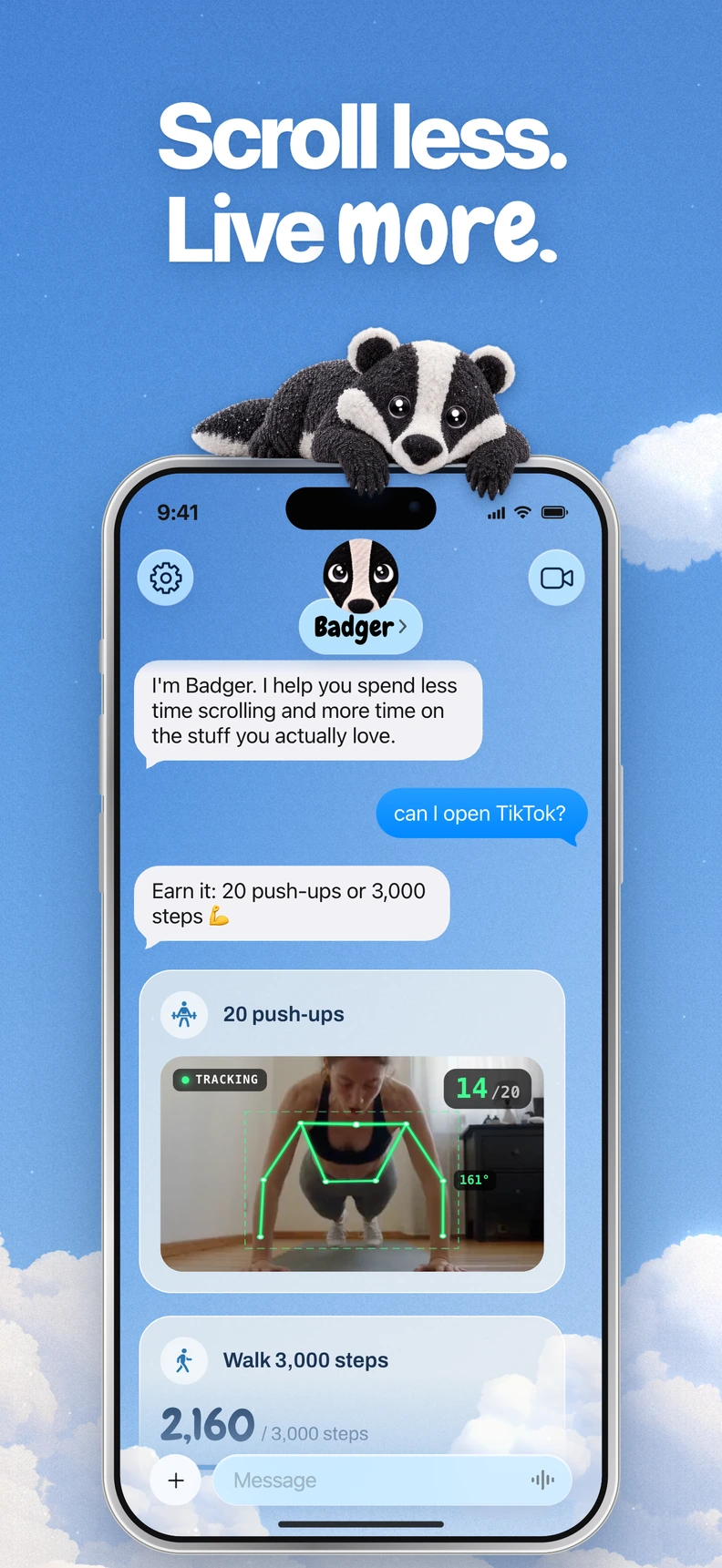
Badger is a personal AI agent focused on one thing: helping you live a more meaningful life. You can text it about what matters to you. It can make a plan, block distracting apps, and help you follow through.
Badger and Zario comparison
| Choice | Badger | Zario |
|---|---|---|
| Platforms | iPhone (iOS 18 or later; the App Store listing also supports iPadOS 18+) | iOS and Android listings |
| Blocking mechanism | Select apps to block from Apple's picker, authorize Screen Time, set up named groups of apps, and build a plan with Badger | Focus schedules, Quick Block, session limits, and Strict Mode |
| Unlocking mechanism | Talk to the agent to explain your situation. Blocks can be attached to activities like walking, a step count target, arriving at the gym, or taking a picture. Emergency unblock is available without the need for AI approval | iOS users negotiate with the AI coach to grant or refuse additional access. Its website describes chat with Zario or a $2 accountability fee as ways to exit Strict Mode; check the terms for your platform and configuration |
| Personalized assistance | The blocker's agent remembers your goals and context, proactively checks in on you, and modifies your plan when it isn't working | An AI coach conversation documented on iOS; Zario's website describes humorous, personalized pauses |
| Pricing strategy | Free to download and use today with a weekly AI allowance. No subscription on the current pricing page | The iOS listing describes a free trial followed by paid subscriptions; confirm the current price in-app. Its separately described $2 Strict Mode exit fee is not the subscription price |
Check the blocker's pricing page for the current allowance and emergency rules for Badger, and Zario's website for its current payment terms.
The main differentiating factors
Three factors could determine whether you should get Badger or Zario:
You use Android. Badger is positioned for iPhone, with iPadOS 18+ also supported in its App Store listing, and doesn't offer Android or native Mac/Windows blocking. Zario has both iOS and Android listings, which makes it a practical option if your second phone runs Android. Note that Zario's Android description mentions things like tracking, schedules, app and session limits, mindful pauses, and force-closing. It doesn't confirm that the iOS strategy of negotiating with the AI coach works the same way on Android. If that matters to you, check the Android app itself.
You want app blocking based on your actions. That's one way Badger stands out. The same app can be used in the context of a focused work session, a mindful break, or an unwanted late-night scrolling session. A useful plan can consider when blocking makes sense and what help you want. With Badger, you can create a plan that ties the apps you want to block to concrete things like going to the gym, logging walking steps toward a target for the day, or another supported activity. The specific targets and the conditions for unlocking depend on the plan you create, which you can talk about and tweak. If you want an action-based plan that focuses on a specific objective, Badger may fit. You can follow the guide on earning screen time through walking.
You want a blocker with extra friction. Zario has something called Strict Mode that takes your screen time goals seriously. According to the website, the vendor describes chatting to Zario or paying a $2 accountability fee as ways to exit Strict Mode. This $2 fee is a loss-aversion strategy and is not a subscription fee. That's how the vendor describes it, so check it in the app for yourself. If the stated fee is the deterrent you need, then Zario could be the right blocker for you. But if you would rather discuss changed circumstances and have an emergency unblock available without AI approval or a payment per exit, that points toward Badger.
AI assistance: Badger vs Zario
Zario's iOS description says you can negotiate with an AI coach that can grant or refuse additional access. Similarly, Badger can act on app access, but it also remembers your goals and context, proactively checks in on you, and adjusts your plan when it isn't fitting. Badger doesn't read your mind. Badger can be circumvented or uninstalled, and repeated requests do not guarantee that an active commitment will be cancelled. Badger aims to close the gap between what you meant to do and what you ended up doing by asking you about your goals, instead of guessing your intent.
If you want to avoid going back into a distracting, information-dense feed, Badger also has alternative options: Light social views and generated mini apps. Zario describes its own humorous and personalized pauses.
As an optional secondary feature, Badger can integrate with a compatible external assistant via MCP/OAuth to list authorized groups and request blocks or unblocks with a reason. More information on how to do this is here. Note that you don't need an external assistant to use Badger.
Short checklist to help you decide
- What kind of devices do you use? If it's just your iPhone, both options are possible. If Android is one of your devices, Zario has an Android listing.
- Do you want your app access to be activity- and goal-oriented or time-based, with schedules and limits?
- If you want extra time, do you want to negotiate, pay a $2 fee, modify a plan, or use emergency unblock?
- Do you prefer a free download with a weekly AI allowance, or do you want to confirm Zario's current payment terms before choosing it?
FAQ
Is Zario's $2 fee a subscription? No. It's an accountability fee described as one way to disable Strict Mode, not a subscription price. Confirm current payment terms in the app, since they may differ by storefront and configuration.
Does Badger work on Android or desktop? No. Badger is positioned for iPhone, and its App Store listing also supports iPadOS 18+. Android and native Mac/Windows blocking are not offered. Zario has both iOS and Android listings.
Can Badger be bypassed? Yes. Badger can be bypassed or removed, and it provides emergency unblock without AI approval. Zario's Strict Mode lists exit paths through chat or the accountability fee.
One more practical point: Zario's store listings show old update dates (iOS 4.6.2 from March 2025, Play updated January 2025). This is not necessarily a sign of an inactive service, but it's still worth checking the current listing before you install.
Sources
- Badger on the App Store
- Badger: iPhone app blocker
- Badger pricing and about Badger
- Zario website
- Zario on the App Store
- Zario on Google Play
If you're on iPhone, try out Badger's approach by downloading the app, picking one or two apps that steal your evenings, and telling it what you'd rather spend that time on. On Android, start with Zario's listing and check its Strict Mode terms in the app before relying on them. You can also compare your options in the app blocker comparisons or read how to block apps on iPhone for the underlying Apple setup.
Questions or corrections? Use Badger Support. More on the Badger blog.