
 vs
If you're an iPhone or iPad user who wants a flexible blocker that evolves with you, Badger is the better choice. If you need a blocker that works across many devices and lets you set limits and see detailed reports, StayFree has a wider range of tools to offer. Both have iOS versions.
They do have some overlap, but they're not really interchangeable because they have different focuses. The following comparison data was taken from the official documentation and store pages of each product as of November 9, 2026.
Feature comparison
| Feature | Badger | StayFree |
|---|---|---|
| Platform | iPhone (iOS 18+), iPad (iPadOS 18+) | iOS, Android, Windows, Mac, Linux, browser extensions, Wear OS (varies by platform) |
| Blocking | Select your distracting apps in Apple's picker and authorize Screen Time. Create named app groups. | Offers instant blocks, customizable schedules, daily and session limits. |
| Restoring access | Restores on plan-determined terms, such as walking a certain number of steps, reaching a daily step goal, arriving at the gym, or taking a picture. Unblocking for emergencies does not require AI approval or AI credits. | Unblocks on schedule or when the limit resets according to the rules you set. |
| Personal agent | Has an agent that remembers goals and context you share, can check in with you proactively, and can adjust your plan if it's not working. | Has a Wellbeing Coach, introduced in StayFree's iOS 3.14 update, which offers personalized screen-time recommendations based on app-usage history. |
| Pricing | Free to download and use now. Includes a weekly AI allowance. It does not have a subscription as of the current pricing page. | Official pages offer free downloads; check the listing for current pricing details. |
StayFree is broader and has an iOS app that also allows you to link its Chrome and Firefox browser extensions. Badger is more personal. Instead of setting a blocker and praying, it treats the process as a negotiation and re-negotiation.
Focus
StayFree is more rule and data-driven. It creates rules, such as a 30-minute-a-day limit for a game or blocking a news app after 9 p.m., and it tracks data. On Android, its listing also includes a CSV export, a password to lock settings, sleep and focus modes, and synchronized limits on linked devices. These are specific to that platform, so don't assume they all exist in the iPhone app. The iOS listing confirms it has app blocking, schedules, usage reports, and can link to desktop browser extensions.
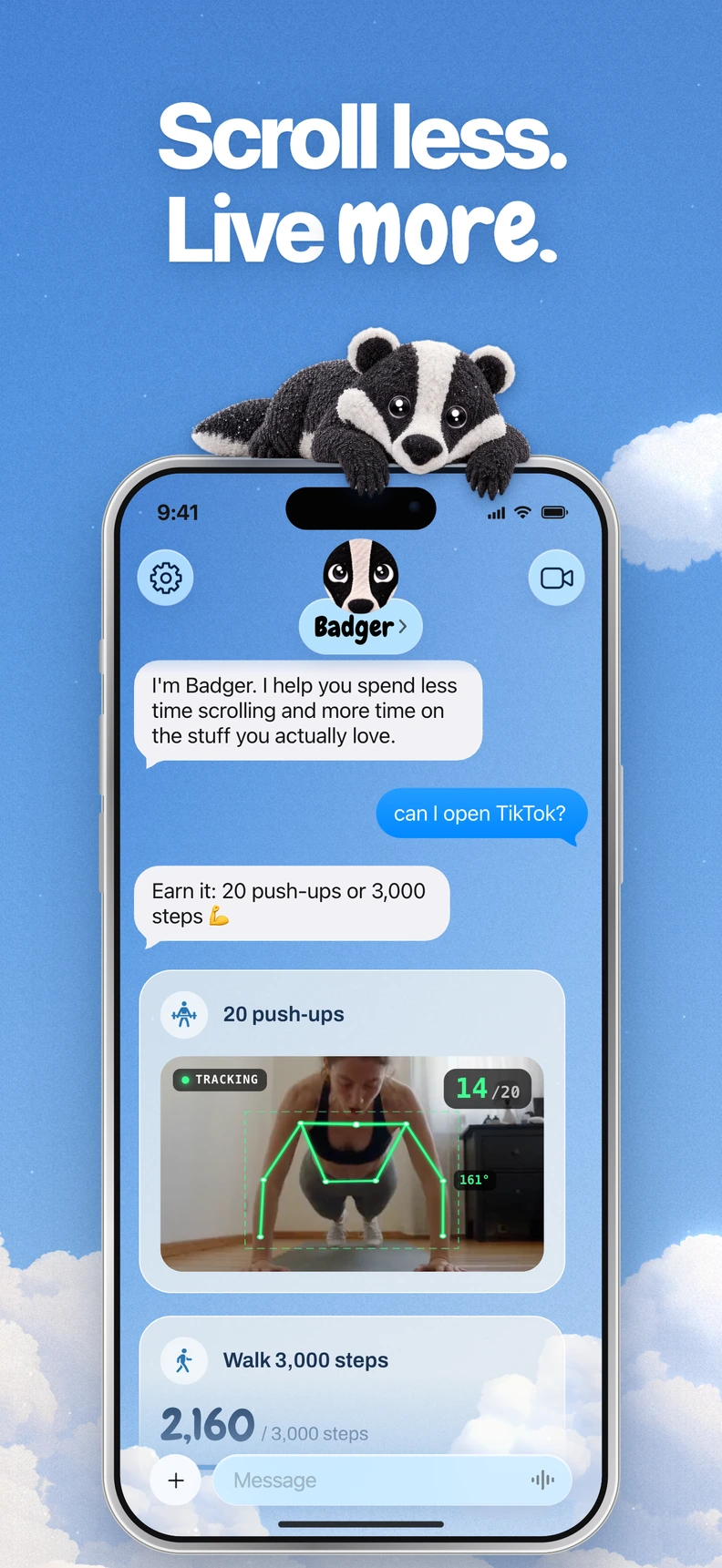
Badger is a personal AI agent focused on one thing: helping you live a more meaningful life. You can text it about what matters to you. It can make a plan, block distracting apps, and help you follow through. It has a familiar blocking method that still lets you use Apple's picker and authorize Screen Time. You can text Badger about your goals; it can remember the context you share, check in, and take action on app access. If your plan isn't working, you can discuss a new approach instead of silently turning off a rule.
If it helps, consider this. The same app can be used in different ways. Sometimes someone checks a social feed to do research for work. Sometimes they take a deliberate break in the afternoon. And sometimes, they needlessly scroll in the middle of the night. A fixed schedule can't tell which you intend, but you can tell Badger your intention and share context. Badger doesn't read your mind, but it helps you to connect your intention with reality.
It can also make the plan about what you want to do with your time. For example, it may ask you to take new walking steps, set a daily step goal, go to a gym, or send a picture. These are just examples and are not necessarily required physical exchanges. Going to a gym doesn't prove you worked out. A picture can only be judged so far.
For important things, emergency unblocks do not require AI approval or AI credits. Repeated requests don't guarantee that an active commitment will be cancelled. You can break or delete Badger if you're determined, so don't get the wrong idea. This is a blocker with some friction and a thinking partner.
Three deciding factors
You want a single system for many devices. This is where StayFree is the practical choice. Badger is iPhone-focused and does not offer native Mac, Windows or Android blocking. StayFree's iPhone app blocks apps and links to its Chrome and Firefox browser extensions.
Your issue isn't awareness, it's action. If you already know how much time you lose, another chart may not change your 11 p.m. decision. If you're looking for a system you can talk to when a plan isn't working and that assists in modifying your approach, Badger might be more suitable. There is an analogy to Badger in the StayFree ecosystem, the Wellbeing Coach. The Wellbeing Coach operates by taking into consideration your personal app usage trends to deliver personalized insights. That coach offers recommendations, while Badger can take action on app access and adjust a plan.
You know the rules you want and you want them implemented without fuss. If you'd prefer that you can just set up schedules, limits per session, and limits per day, and then never talk about it again, then StayFree might be a better, more straightforward option. StayFree documents user-configured rules and cross-device reports, plus usage-based recommendations from its Wellbeing Coach. Badger explicitly offers conversational plan adjustment. Badger could seem like overkill if you're just looking for a consistent 9-to-5 news blocker, and that's all.
Some questions to ask yourself before you decide
- What platforms do you really need to cover, just this phone, or phone + laptop + another phone?
- Are you comfortable defining your own rules, or are you looking for some assistance when your rules aren't working?
- Would the prospect of unblocking selected apps by going for a walk, checking in at the gym, or taking a picture be motivating or annoying?
- If you're really desperate, do you need an emergency exit, and do you know if/how it works in your chosen approach?
- Are you on Chrome or Firefox on desktop (StayFree's iOS app links to those desktop extensions)?
As an optional extra, Badger can additionally integrate with a compatible external assistant via MCP/OAuth to list authorized groups and request blocks or unblocks with a reason. That's just a side door into the system and not required; see the connect guide for details.
Sources
- Badger on the App Store
- Badger: iPhone app blocker overview
- Badger pricing and weekly AI allowance
- Badger support
- StayFree website
- StayFree on the App Store
- StayFree user guide
Next steps
If you think the agent approach is for you, go ahead and download Badger from the App Store while you're making your choice. Just begin with a small first step: create one named app group, select its apps through Apple's picker, authorize Screen Time, and prepare a simple initial plan that you can experiment with and modify as needed. The guide to earning time by walking and guide to blocking apps on iPhone will walk you through the process. If you think the multi-device support is the priority, start by downloading StayFree for free, and just set up one schedule for the worst offender, and see how much things actually change before adding in more complexity.
Questions or corrections? Use Badger Support. More on the Badger blog.