
 vs

If you'd like custom iPhone rules and a separate Mac app, with strict settings like a passcode to edit settings or an NFC scan to lift a block, go with Refocus. Consider Badger if you want iPhone app blocking with a personal agent that remembers your goals, checks in proactively, and links app access to what you want to do with your time.
The information below is based on public information from the apps' websites and App Store listings as of November 9, 2026.
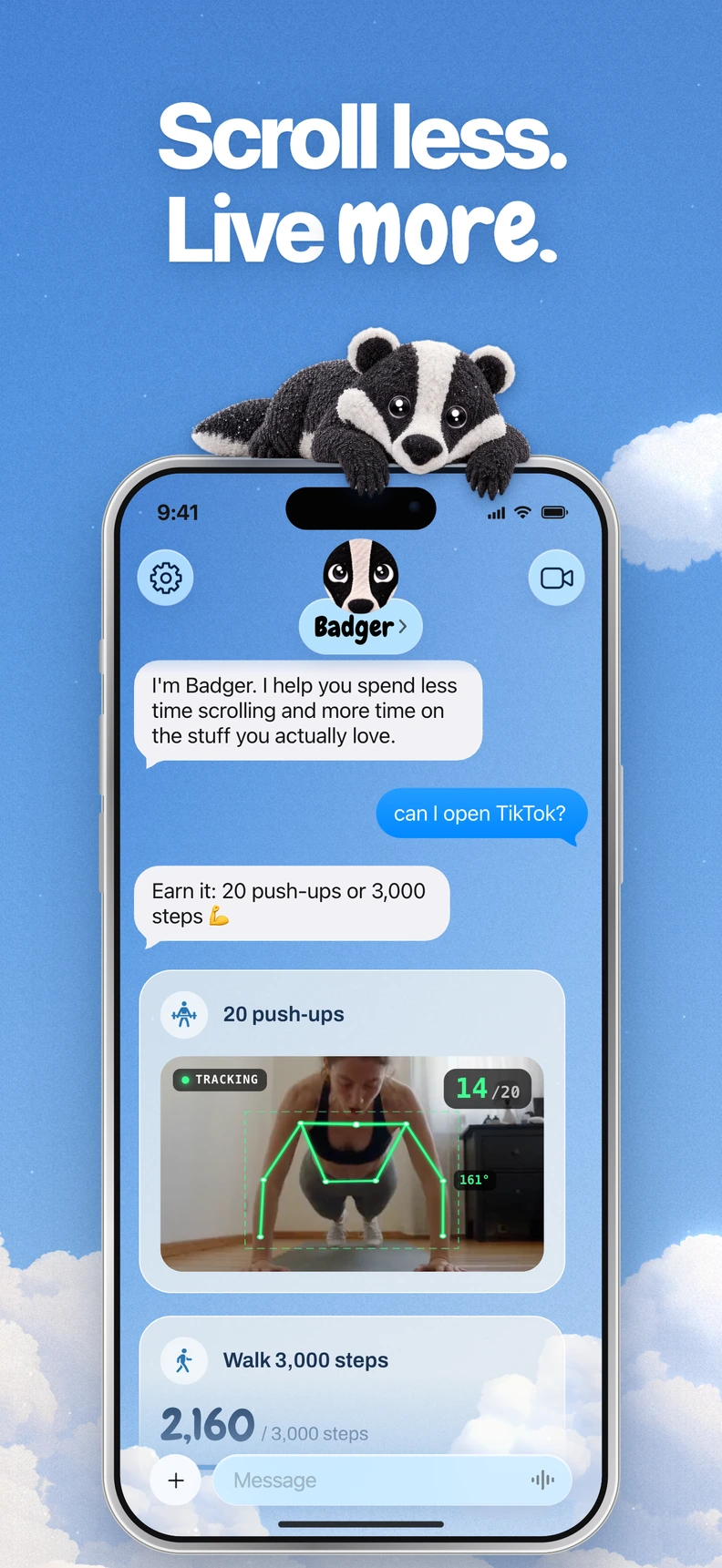
Badger is a personal AI agent focused on one thing: helping you live a more meaningful life. You can text it about what matters to you. It can make a plan, block distracting apps, and help you follow through.
Badger vs. Refocus Comparison
| Category | Badger | Refocus |
|---|---|---|
| Devices | iPhone, iOS 18 or later; iPad, iPadOS 18 or later (App Store). No native Mac, Windows, or Android blocking. | iPhone app and website blocking, plus a separate Mac app that its help center still labels a beta. |
| Blocking Features | Pick apps from Apple's picker, authorize Screen Time, sort apps into named groups, and create a plan with Badger. | Block apps and sites with immediate duration blocks, schedules, usage limits, and location-based triggers. Multiple overlapping sessions are supported (help center). |
| App Unlocking | Plan-based or conversational, or emergency unblock with no AI approval or AI credit needed. | Configured unlock conditions: daily unblock limit, editing passcode, NFC scan, countdown or copy-text task, break limits, or cooldowns. |
| Personal Assistance | AI agent to remember objectives and context you share, proactively check in with you, and modify plans that aren't working. | Rules, schedules, and strict settings. |
| Cost | Free to download and use with a weekly AI allowance. There is no subscription, per the current pricing page. | Check its App Store listing for current pricing. |
What Makes Badger Different
Badger is built around the gap between what you meant to do and what you ended up doing. The same social app can serve three purposes within a single day: contact a colleague, take a scheduled break, or mindlessly scroll late into the night. A schedule alone doesn't capture this distinction. Badger doesn't purport to know what you're thinking, but it does listen to what you tell it, and remember the objectives and context you give it.
A plan aligns app blocking with your intentions. For example, a plan might involve a daily step goal, arriving at a gym, or a photo. Rather than using a fixed rate of exchange, you can discuss objectives and unlock conditions with the agent; terms vary by plan.
With relevant permissions, steps, location, and photos can support a plan. There are limits, though: arriving at the gym isn't proof of a completed workout, and photo assessment is not infallible. You can discuss changes with Badger when a plan stops working, rather than edit the relevant settings yourself.
If a real need arises, you can emergency-unblock something without the AI agent's permission or AI credit. Repeated requests do not guarantee that an active commitment is cancelled. Badger can be bypassed or removed. There are also Light social views and generated mini apps that offer alternatives to returning to the full distracting feed.
What Makes Refocus Different
Refocus takes the same question from a configuration angle. App and website blocking in advance is configurable. You can set immediate duration blocks, schedules, usage limits, and location-based triggers. You can even configure overlapping sessions. And where you want to add some friction, Refocus has strict settings: a limit to the number of times you can unblock things each day; a passcode needed to change settings; an NFC scan to get past a block; a countdown or copy-text task to unblock before a break; and break limits and cooldowns.
Hardware-based unlocks are not confined to Brick and Unpluq.
You can tailor it to Safari to exclude certain parts, such as YouTube Shorts and Instagram's feed, Explore, and Reels. This filtering works in Safari, not inside the native Instagram or YouTube apps (help center). Refocus also has a separate Mac app with native app and website blocking, schedules, strict settings, and timed pauses (Mac app).
Three common deciding factors
- Mac: Refocus supports iPhone and Mac; Badger supports iPhone and iPad. If you have a laptop that needs app blocking and you are only picking between these two, Refocus is the one.
- You can express a rule: Say: “I want to block a video app after dinner on weekdays, except once. I want to secure it behind a passcode.” That's exactly what Refocus is built for out of the box: scheduling, limits on breaks, passcodes, and even NFC. No talk needed.
- You want help adapting a plan: Say you want to tell Badger about your evening, adjust a plan that's not working, and get a nudge before you get sidetracked. Refocus relies on the conditions you've configured, so changing them means going back into settings.
Fast decision checklist
- What device(s) are experiencing your distraction? Refocus also has a separate Mac app.
- How do you want to regain access? Based on settings-based conditions, or by negotiating actions in a plan?
- What version of your OS do you have? Badger requires iOS 18 or later. Refocus requires iOS 26.2 or later to apply its Safari filter (help center).
- Do you prefer persistent rule sets, or adaptive plans you can talk over time?
FAQ
Does Refocus block Reels in the Instagram app? No. Refocus's Safari customization does not filter those surfaces inside the native app; it works at the browser level.
Can I run Badger on the Mac? No, Badger is designed for iPhone (the App Store listing indicates support for iPad) and does not offer native Mac or Windows blocking or Android blocking.
Do I need to bring an AI assistant with me to use Badger? No. Badger works without another assistant; a compatible external assistant can optionally connect via MCP/OAuth to list authorized groups and request blocks or unblocks with a reason.
Try the one for you
If you are the kind of person who thinks in terms of plans, download Badger from the App Store, select your distracting apps in the Apple picker, enable Screen Time authorization, and tell Badger about one plan you want. Maybe you want to work towards a step goal before you scroll in the evening. Follow this guide to check that the blocking works. If you are still comparing things, check out the broader comparison of app blockers.
Sources
Questions or corrections? Use Badger Support. More on the Badger blog.