
 vs

Brick is a better choice if you want a physical device you can place in another room or use an Android phone running version 12 or later. Badger is worth a try on an iPhone if you want to take a goal-oriented approach to distraction blocking.
Summary recommendation
Brick is designed for anyone who prefers a deliberate, physical friction method for blocker sessions. You can place its physical device somewhere separate from your phone (such as a kitchen drawer) before a night you want to keep protected. It also functions on Android 12 or later, which Badger does not.
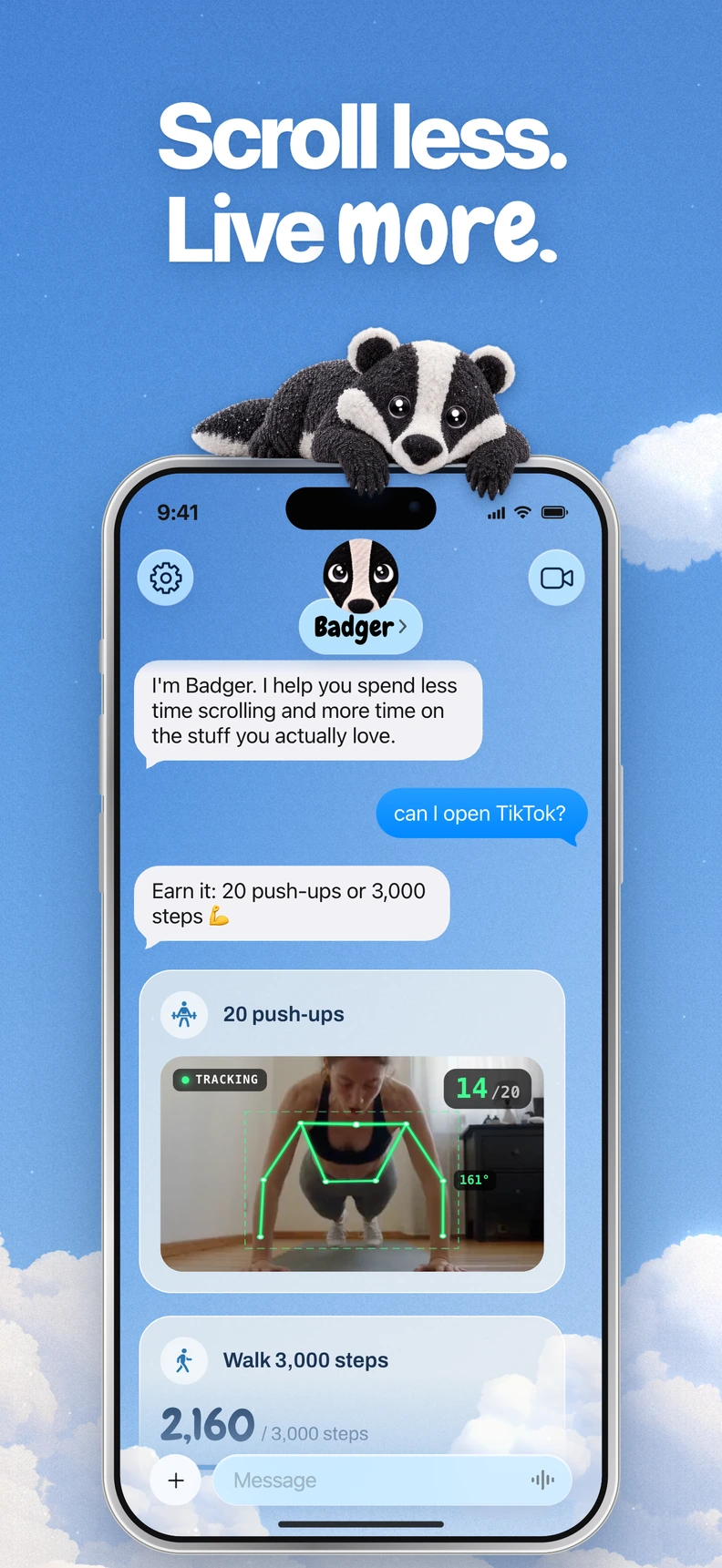
Badger is a personal AI agent focused on one thing: helping you live a more meaningful life. You can text it about what matters to you. It can make a plan, block distracting apps, and help you follow through. Badger will allow you to select distracting apps, organize those apps into named groups, and make a plan with Badger. Badger can remember goals and context that you've provided, proactively check in, take action on app access, and adjust plans when the approach you're taking isn't working. Badger is currently free to download and use with a weekly AI allowance and no subscription under its current pricing model.
They are not necessarily substitutes: Brick offers a physical device, while Badger lets you build a goal-based plan with its agent.
Comparison at a glance
| Feature | Badger | Brick |
|---|---|---|
| Platforms | iPhone (iOS 18 or later) and iPad (iPadOS 18 or later) | iOS 17 or later, Android 12 or later |
| Blocking method | You select apps via Apple's picker, authorize Screen Time, and use Badger to build a plan using named groups | Physical device and app with app and site groups, modes, scheduled blocking, and remote activation by long-press in the app |
| Unlocking methods | Chat with the agent; an emergency unblock is available without AI approval or credit, but repeated requests don't guarantee cancellation of an active commitment | A physical scan normally ends a session; five Emergency Unbricks are documented |
| Personal support | An agent that remembers goals and context you share, checks in, and adjusts plans when needed | The product centers on its physical device, app groups, and modes |
| Pricing | Currently free to download and use with a weekly AI allowance and no subscription under its current pricing model | USD $59 before promotions, accessories, and taxes, with app access included and no recurring subscription |
Comparison details come from each product's publicly available documentation, checked November 9, 2026.
Brick Night is a separate product at USD $129, marketed as an automatic Bluetooth blocker for sleep. This comparison concerns standard Brick.
How to decide: Three factors
You want the physical device away from the phone
The physical device has a clear advantage when it comes to distance. If you tend to scroll late at night, you can put a Brick in another room before bed to create physical separation from your temptation.
Badger works differently. Rather than relying on distance, it lets you discuss real needs and changed circumstances with the agent.
Keep in mind: Badger can be bypassed or deleted. It is not a hard wall, but rather a plan you intend to follow.
The same app can play many roles
Different intentions have different outcomes. You may browse for work purposes, take a moment of intentional reflection, or regretfully scroll at 1 a.m. With Brick, a physical scan normally ends a session, and five Emergency Unbricks are available.
With Badger, you can create a plan that caters to a particular situation. A plan can involve new walking steps, a daily step goal, a gym arrival, a photo, or another supported action. The specifics of a plan will vary, as will the terms of access. You'll set your intention with Badger; it is not designed to guess why you opened an app. If a situation isn't a fit, you can chat with the Badger agent to make adjustments.
Devices are the tiebreaker
If you're on Android 12 or later, Brick is your option; Badger is focused on the iPhone. If your iPhone runs iOS 18 or later, you can use either, and Badger also works on iPad if you use iPadOS 18 or later.
Decision checklist
- Device: Android 12 or later points to Brick; iPhone users on iOS 18 or later can use either.
- Friction preference: a physical device to move out of reach, or a plan to discuss and adjust.
- Plan-based: whether you want plans that connect to actions like walking steps or a gym arrival.
- Budget: USD $59 for hardware, or a free download with a weekly AI allowance.
FAQ
Are they direct substitutes?
Not necessarily. Their approaches overlap, but Brick adds a physical device while Badger offers an agent-guided plan tied to goals you share.
Does Brick have to be rescanned to unlock?
Normally, yes: a scan ends a standard Brick session. Five Emergency Unbricks provide an exception. Strict Mode adds restrictions; it is not itself another unlock method.
Next step
iPhone users can download Badger free from the App Store. Select a single group of distracting apps and design a plan. You can text Badger before deciding whether to dive in on something ambitious.
For information on the setup process, read the step-by-step guide to blocking apps on iPhone. If you'd like to learn more about the current AI allowance and emergency access, check out the pricing page. If you'd prefer to use hardware or you have Android, look into Brick's product page first.
Sources
Questions or corrections? Use Badger Support. More on the Badger blog.