
 vs

If you're drawn to structured frameworks, scores, streaks, challenges and predefined unlock actions, Roots may suit you. If you prefer a living dialogue that evolves as you refine your habits and goals, Badger may suit you.
But if you dig a little deeper, you'll find there's a good deal of overlap between them. Roots combines app-blocking and progress tracking with preset actions you perform to unlock apps.
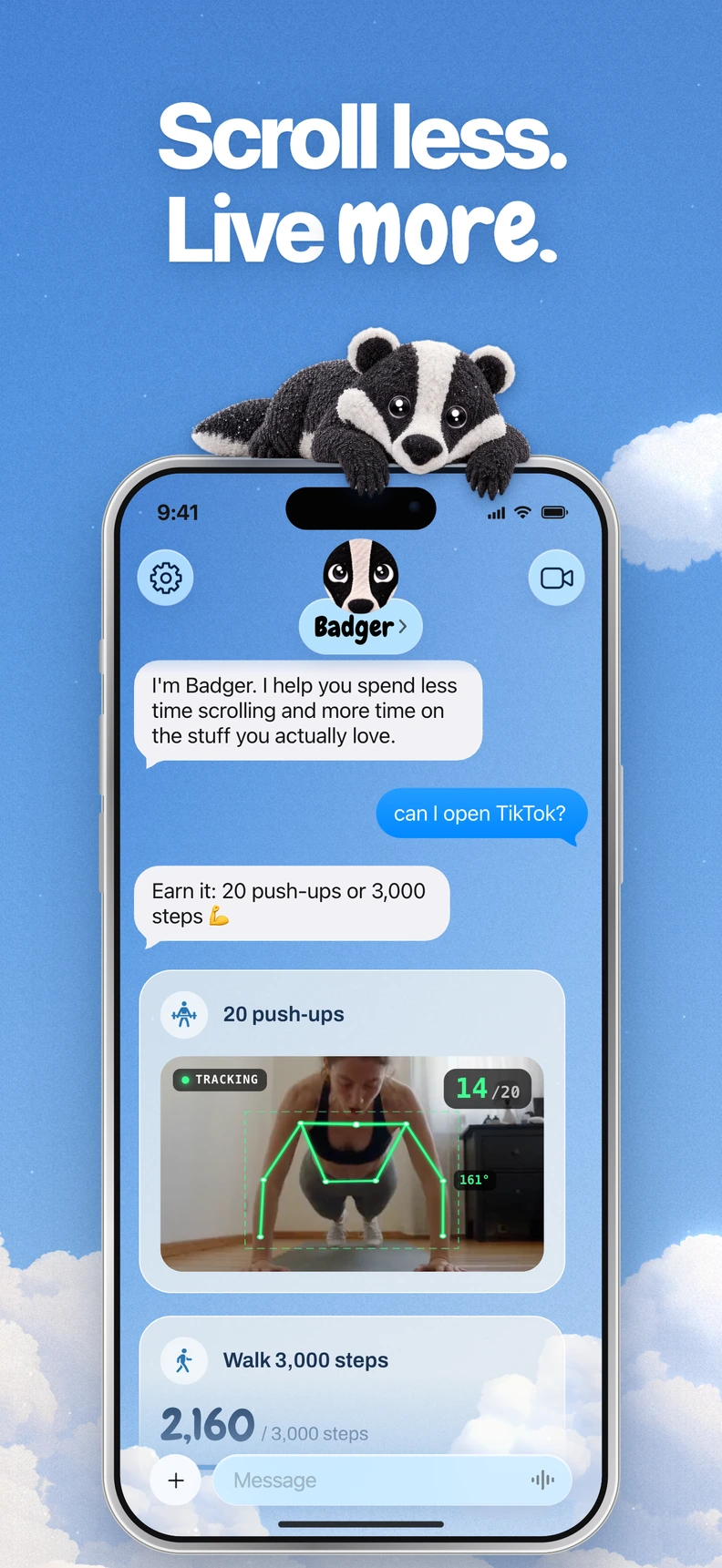
Badger is a personal AI agent focused on one thing: helping you live a more meaningful life. You can text it about what matters to you. It can make a plan, block distracting apps, and help you follow through. It can remember the context you share and adjust the plan when an approach is not working.
The Details
Below is a side-by-side look at both apps, based on information from each app's website, docs, and App Store.
| Feature | Badger | Roots |
|---|---|---|
| Platform | iPhone (iOS 18+); also supports iPadOS 18+ | iOS; Android coming soon (via an interest form) |
| Blocking System | You choose your apps with Apple's app picker, authorize Screen Time, and place your apps into named groups | App and site time limits, limits by open count, immediate blocking, and downtime scheduling |
| Unlocking System | Configured based on your strategy, e.g., meet your daily step goal, add new walking steps, arrive at the gym, take a photo, or use another supported action. An emergency unblock is available without AI approval or credit | Time limits expire; action gates include a camera-detected dog interaction, breathing, or meditation before unblocking; Monk Mode blocks until tomorrow |
| Support | A personal agent that remembers goals and context you share, checks in proactively, and can adjust your plan | Daily goals, Balance Score, trends, streaks and friend challenges |
| Pricing | Free to download and use, with a weekly AI allowance; no subscription on the current pricing page | Free tier with two blockings; Roots Plus is $59.99/year or $9.99/month |
What Really Makes Them Different
At the core, Roots' strategy is built on a system framework, where you can set limits, track your progress with a Balance Score and trends, maintain streaks, and pass through an action gate to unlock apps. It may suit people who want a predictable set of guidelines and a rhythm of their own making. (Note that Roots' “pet a dog to unlock” feature uses the camera to detect a dog interaction, and Roots has since added breathing and meditation gates, too, so it's no longer accurate to call Roots just scores and streaks.)
Badger's strategy focuses on the connection between app-blocking and your intended actions. The agent drives the dialogue across days and weeks. You and Badger formulate a strategy to gate app access with actions like a daily step goal, new walking steps, or arriving at the gym. If it doesn't work, you tell it so, and it can adjust the plan. The trick with Badger is that, depending on the time and context, you can be using the same app for work-related research, a planned break, or an unwanted late-night scroll.
So, a one-size-fits-all approach isn't really an option. Rather than infer what you're trying to do, or the reasoning behind why you clicked an app, Badger tries to bridge the gap between your intention and actual behavior with your goals, i.e., what you tell it. The following three scenarios should help you decide which approach may suit you.
For ongoing accountability
You need accountability, not just app blocking. If you've tried hard app blockers in the past and always pressed the “unlock” button, the problem may not be a stronger wall; it may be finding a plan that fits. With Badger, you can make a plan that requires taking steps or arriving at the gym before a certain group of distracting apps unlocks. You have your dedicated agent to check in on your progress, and to figure out what's not working. The emergency unblock is available without AI intervention or credits, but repeated requests don't guarantee that an active commitment will be cancelled.
For preset routines
You need an immediate, preset action to regain access to your apps. If you find that a predefined action, such as a breathing exercise, meditation or a camera-detected dog interaction, does the trick, Roots offers those gates. The gates are predefined and ready to go, and you can go full Monk Mode (blocks until tomorrow) if that's your thing. Some people like to have fixed routines that work.
For changing situations
You need context-sensitive strategies. You may have blocked apps from deep-work sessions and want access to them for research, but not for your real-life breaks. Or, vice versa. Roots' scheduled downtime covers time-of-day patterns.
With Badger, you can work things out with your agent. For example, you can tell it “the late-night scroll was the issue, and the afternoon check-in was good,” and the strategy can adapt accordingly.
A quick checklist for deciding
- If you want to discuss your habits and modify plans regularly, Badger may suit you. If you want fixed rules to follow, Roots may suit you.
- If predefined action gates appeal to you, Roots offers them. Badger lets you make supported actions part of a plan.
- Badger is free to download and use, with a weekly AI allowance. Roots offers a free tier with two blockings.
- If you'd rather have streaks that you can challenge your friends on, Roots does it. Badger checks in proactively.
- Neither currently offers Android blocking: Roots' Android app is an interest form, and Badger is built around iPhone blocking.
Frequently asked questions
Can Roots' Monk Mode be circumvented? Roots lists locked editing, uninstall protection and pauses, while Monk Mode blocks until tomorrow. Check the available pause and recovery controls before starting a strict block. Badger can also be bypassed or removed.
Do I need another AI assistant to use Badger? No. Badger can optionally connect to an external assistant via MCP. The connection lets an external assistant list authorized groups and request blocks or unblocks with a reason. It's optional; you don't need another assistant to use Badger.
Next step
If you're interested in Badger's collaborative approach, download Badger from the App Store, select your most distracting apps through Apple's picker, and make one small plan: a single app group, one supported action and one goal that matters to you. If you want rituals and streaks, try Roots' free tier and check which action gates are included in the plan you choose. In either case, pick a single app group you can name out loud and start there.
Sources
Questions or corrections? Use Badger Support. More on the Badger blog.